IM-Magic Partition Resizer Free - All Features 100% Free
Manage your disk partitions safely with secure algorithms. All functions are still 100% free in 2026.
Redistribute, resize, move, merge, convert, repair, clone disk, backup partitions, and more.
(How to upgrade: Download and install the latest version. Your existing version will be replaced.)
-
 100% Free for Win 11-XP
 -
 Resize, Move (No data loss, no app reinstall needed)
 -

-
IM-Magic Partition Resizer Free
Manage Disk Volumes without losing data - Redistribute disk space for free
Partition Resizer is free partition management software that lets you expand, shrink, move, and merge partitions, clone disks, back up partitions, migrate your operating system, convert file systems, convert non-RAID dynamic disks to basic disks, convert MBR to GPT, and much more — all while preserving your data (excluding formatting and wiping operations). All features remain 100% free in 2026 (Free edition).
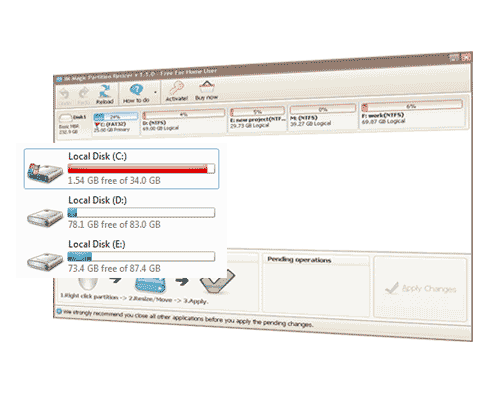
Use the simple drag-and-drop interface to rearrange your disk space. Right-click a partition to resize or move it—your files stay intact, and your apps remain installed and ready to use. It works on every drive, even the running C: system partition.
What's special about Partition Resizer?
No data loss or app reinstallation is needed after partition or disk management using Resizer. It includes a Portable Partition Manager for ultimate flexibility. Power-off and rollback protection is included — if a task (resizing) fails for any reason (human error, power surge, system crash, or other unexpected interruption), everything is automatically restored to its previous state. In other words, your data and partitions remain completely safe, no matter what.
(Bootable version is available in Resizer Paid Editions. )
Note: If you need to use it on Windows Server, Partition Resizer Server (Commercial, needs a license) works for ALL Windows Servers including Server 2003-2025 R2 SBS

100% Free for Windows PC (Windows 11-XP)
Trial for Windows Server(2025-2003)
 What's New: Partition Resizer has been updated to version v7.9.2 on May 24, 2026. Bug fixed (version history)
-
Main Function List ( Right-click a partition or disk to access these functions)
-
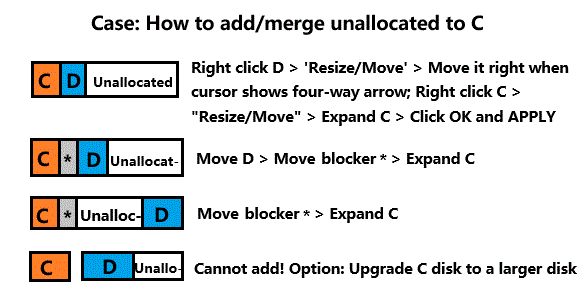
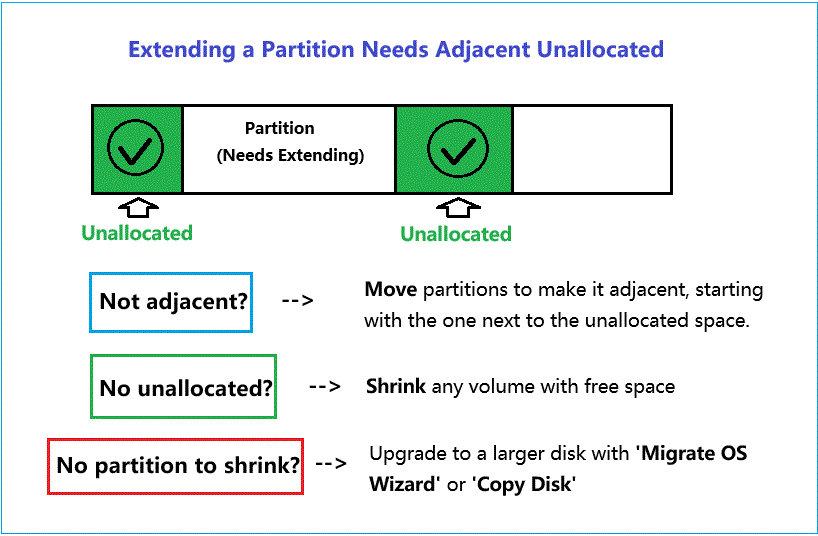
 Extend a partition with left/right unallocated space [No data loss. A partition can only be extended into adjacent unallocated space. If the unallocated space is not adjacent, move the blocking partition to make it adjacent, starting with the one next to unallocated. If there is no unallocated space, shrink another volume to create some. If there is no partition that can be shrunk, upgrade the disk to one with a larger storage capacity.]
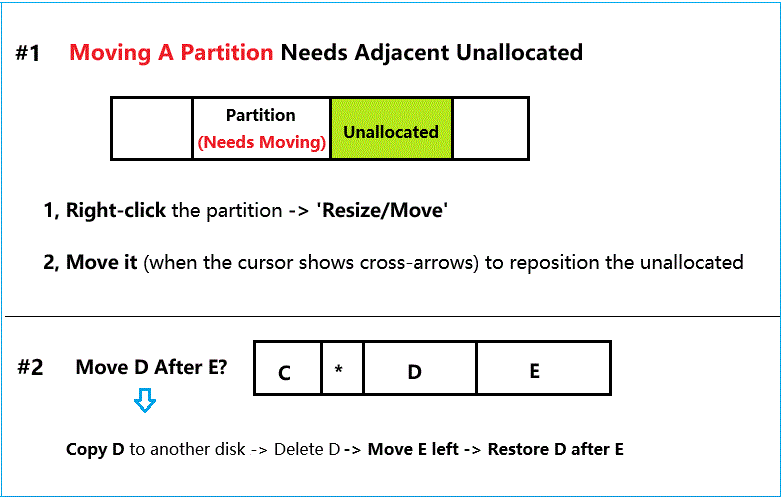
 - Move a partition to change the location of its adjacent unallocated space without losing data. [Can only move a partition when it has adjacent unallocated space.]
- Resize/shrink/extend/move any partition (Data&OS) without losing data including the EFI System Partition (ESP), Healthy Recovery Partition, OEM partition, System Reserved Partition, and Healthy Primary Partition, etc. (It can expand a partition when it has adjacent unallocated space. No unallocated? ->Shrink any volume. If not adjacent, move any blockers (if they exist) to make it contiguous. Read details...)
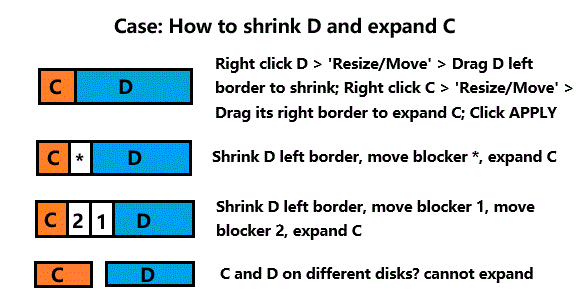
- Redistribute disk space among partitions by shrinking a large volume, moving the blocking partition, and extending the target volume. (start moving the partition next to the unallocated)
- Merge contiguous volumes without losing data. (Extra: How to merge C and D, seperated by EFI or Recovery)
- Encrypted drive: Shrink, extend, move BitLocker partition? Decrypt/unlock first.
- Convert dynamic disk to basic without data loss (Do not convert RAID to basic disk or data will become inaccessible).
- Convert mbr to gpt disk without losing data (Non-OS disk).
- Convert ntfs to fat32 without losing data.
- Set partition active, primary/logical without losing data.
- Copy partition to unallocated space for backup.
- Repair bad blocks with 'Check Partition'; repair filesystem; defrag disk/partition; repair logical errors by formatting(will lose data).
- Clone disk (100% disk cloning with disk properties). (Copy Disk1 to Disk2 will remove all old data on disk2. Please backup first.)
- Use the "Migrate OS Wizard" under Tools to migrate the OS disk to another disk. (Also read: How to fix OS disk full problem) (Migrate Disk1 to Disk2 will remove all old data on disk2. Please backup first.)
- Wipe disk/partitions/sd/usb completely without chance of recovery. (Will lose data)
- Delete/Format partition (Will lose data)
- Supported Operating Systems
- Windows 11 10 8.1 8 7 Vista XP (Resizer Free, Pro, Server +)
- Windows Server All (Resizer Server +)
- VMware Windows OS compatible.
- Supported Languages
- English, German, French, Spanish, Japanese, Portuguese
Italian, Korean, Traditional Chinese, Dutch etc.
- Supported file systems
- FAT12/16/32 NTFS
- Supported Storage Devices
- Support UEFI/EFI boot.
- Support MBR disk and GPT disk.
- All storage devices recognized by Windows, such as RAID, etc.
- Traditional hard disk drives, solid-state drives (SSD), SSHD, etc.
- Up to 64 disks from 16TB to unlimited disks depending on editions.
How to expand: Right-click the partition that is next to unallocated space and select 'Resize/Move'. Hover the mouse over the edge of the partition until the cursor changes to a double-headed arrow, then drag the partition border into the unallocated space. Click OK, then click APPLY to finish. (Can only expand when there is adjacent unallocated, or you may merge partitions.)
How to move a partition: Right-click the partition that is adjacent to unallocated, select 'Resize/Move'. Hover the mouse over the middle of the partition until the cursor changes to a four-way arrow, then drag the partition to the desired location. The unallocated space will be adjusted accordingly. Click OK and APPLY to finish, or APPLY in batch. (Can only move a partition when there is adjacent unallocated, or you may move a partition by copying it to the unallocated.)
How to merge two partitions: Right-click one of the partitions and select 'Merge Partition'. Select the two adjacent partitions you want to merge into one. Note: C and D must be merged into C. If the layout is C + Recovery + D: copy D to another disk for backup, delete the old D, move the Recovery partition to the end of the disk, restore D before the Recovery partition, and then merge C and D. (Data on D drive will be moved to C drive under a folder named like 'D into C')
How to merge C with non-adjacent unallocated space: Right-click the blocking partition, starting with the partition next to the unallocated space, and select 'Resize/Move'. Move the blocking partition to place the unallocated space next to C, and then expand C.
Why IM-Magic Partition Resizer?

100% Safe Roll-back Tech
Thanks to its unique roll-back protection, this program ensures your data and partitions stay safe whenever a task is left incomplete — whether you stop it on purpose or an unexpected disaster occurs (such as a power surge, outage, or system crash). In any such case, everything is automatically restored to its normal state, with no damage to your data or partition structure.

64-Bit Independent and Portable App
The software has an independent 64-bit app for your special requirements to ensure program stability. The software package includes both 32-bit and 64-bit .exe files, as well as a portable edition for more flexibility.
Extend C System Drive
C: drive running out of space? Resizer Free helps increase the boot volume, saving you from reformatting the disk, reinstalling the operating system, or moving data elsewhere. Resizing the system partition is an easy task, even for tech novices. You can add free space from any partition to the C: drive by shrinking, moving partitions(if a blocker exists), and extending the C: drive once the unallocated space becomes adjacent to it.
Shrink/Extend Partition
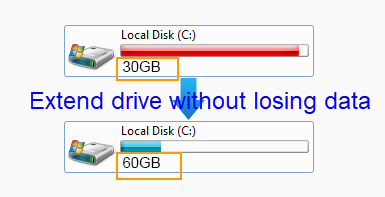
Shrinking/Extending disk volume size without losing data is possible with IM-Magic Partition Resizer Free. You may decrease a large volume which holds too much free space without formatting it. Modifying any partition size with data untouched. To access the function, just right-click a partition and it shows 'Resize/Move' for easy use
 $399
$399