Move EFI System Partition to End of Disk
To move EFI system partition to end of disk, strict conditions must be met.
This quick guide explains the requirements and how to do it using the free
IM-Magic Partition Resizer.
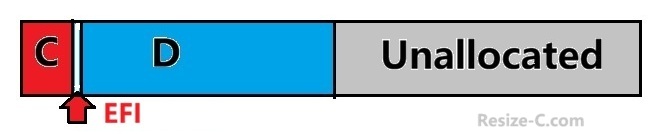
Mandatory Conditions Before Moving EFI Partition
⚠️ Unallocated space is required for moving a partition. When moving the EFI system partition, the following rules apply:
- ✔ Adjacent unallocated space must exist next to EFI
- ✔ No partition can exist after the EFI partition
- ✔ EFI can only be moved into available unallocated space
If another partition is located after EFI, it must be moved or removed first.
Note: Please backup partition to another disk or external disk first before the removal. IM-Magic Partition Resizer has Copy Partition feature for a full partition backup. And it's free. See details: How to backup partition
Video: How to move EFI partition to end of disk
For Windows 11/10/8/7: Download Partition Resizer Free [100% Free]
For Windows Server 2025-2003: Download Partition Resizer Server [Trial]
Why Move EFI System Partition to End of Disk?
- ➕ Extend C: drive
- 💽 Fix blocked unallocated space
- 🔧 Optimize GPT disk layout
❌ Windows Disk Management does not support moving EFI partitions.
Free Tool: IM-Magic Partition Resizer
IM-Magic Partition Resizer supports EFI/GPT disks and safely moves partitions without reinstalling Windows.
- ✔ Free edition available
- ✔ EFI system partition supported
- ✔ Boot files preserved
Steps to Move EFI System Partition to End of Disk
-
Note: Ensure no partition exists after EFI (Backup, delete)
- launch IM-Magic Partition Resizer
- Create adjacent unallocated space near EFI by deleting all partitions after it (Please backup these partitions first to another disk)
- Select EFI system partition
- Choose Move/Resize
- Drag EFI partition to the end of disk
- Click Apply
✅ EFI system partition is moved successfully when all conditions are met. An OS reboot is required when moving the EFI system partition.
Also read: How to move a partition to end of disk
FAQ
Why can’t EFI be moved if a partition exists after it?
IM-Magic Partition Resizer can only move EFI to the disk end when no partition is positioned after it, because partitions can only move into unallocated space.
Is moving EFI partition safe?
Yes, it is safe when using IM-Magic Partition Resizer correctly.
Conclusion
To move EFI system partition to end of disk, you must have adjacent unallocated space and no partition after EFI. With these conditions met, the free IM-Magic Partition Resizer offers a simple and secure solution.
More Related Articles You May Like
Related Product
- IM-Magic Partition Resizer Server - Partition space redistributing software that works for Windows Server 2003-2025.