Guide: How to Convert a Dynamic Disk to Basic [DO NOT CONVERT RAID]
This guide shows how to change a dynamic disk to a basic disk without deleting any partitions using the free tool IM-Magic Partition Resizer Free. All data will remain untouched at the end of the process.
Note: Do not convert a RAID dynamic disk to basic, as RAID is built from multiple disks. If one disk becomes basic, data on the disks will become unreadable. This option only works for NON-OS disks.
Here are the steps to convert a dynamic disk to basic using IM-Magic Partition Resizer.
Video: How to convert a dynamic disk to basic without losing data in Windows
Preparations: Download and install IM-Magic Partition Resizer on your computer, then run it.
Step 1: Right-click the disk and choose the option "Convert to Basic Disk". (Do not click on a specific partition or volume; otherwise, the option will not appear.)
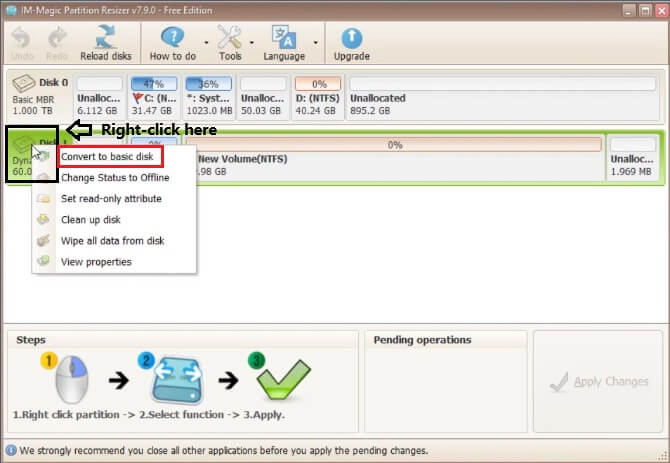
Step 2: Confirm the conversion and wait for the process to complete.
Your disk is now basic. You can verify this in Disk Management.
For Windows 11/10/8/7, dowload free software => Download for Win 11-XP [100% Free]
For Windows Server 2025-2003, Download free Demo => Download for Win Server [Trial]