Cant Merge Unallocated Space to C Drive in Windows 10 & 11
Many Windows users often encounter the issue where they cannot merge unallocated space to the C drive. This problem can happen in both Windows 10 and 11, leaving your C drive stuck with limited space despite having available unallocated storage on your disk.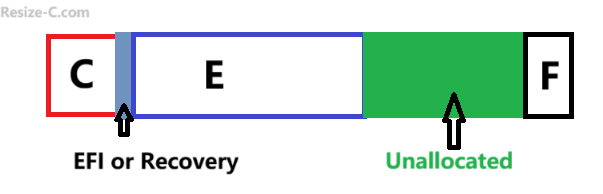
Causes of "Cannot Add Unallocated Space to C Drive"
Many Windows users run into the problem where they cannot combine unallocated space to the C drive. This usually happens because of how Windows handles partitions. Here are the main reasons:
- Partition Placement: Windows can only merge unallocated space that is directly next to the C drive. If another partition sits in between, Disk Management cannot extend C. In simple terms, the unallocated space must be immediately to the right of the C drive.
- Different Partition Types: Your C drive is usually NTFS. If the unallocated space comes from a different type (like FAT32) or there’s a mismatch between GPT and MBR disks, Windows will not allow merging.
- EFI or Recovery Partitions: Special system partitions like EFI or Recovery cannot be deleted or moved. If they sit between the C drive and unallocated space, merging is blocked.
- System Restrictions: Disk Management has built-in limits. Even if the unallocated space is adjacent, Windows may refuse to extend the C drive if system rules are not met.
- Corrupted Partition Table: The partition table tells Windows where partitions are. If it is damaged or corrupted, merging will fail.
In short, to successfully merge unallocated space to the C drive in Windows:
- Your C drive must be NTFS.
- No EFI or Recovery partitions should be in the way.
- No other partitions should sit between C and the unallocated space.
- Both must be on the same physical disk unless you migrate the OS.
The good news is all these issues can be easily resolved using the free IM-Magic Partition Resizer, which lets you safely move, resize, and merge partitions without the usual Windows restrictions.
Note: If the unallocated space is on a different physical disk, you cannot directly add it to the C drive. In this case, a better solution is to migrate your OS (C drive) to a larger disk using the free IM-Magic Partition Resizer. Adding space from another disk is more complex and usually requires advanced setups like RAID, which can be risky and difficult for most users.
How to Fix "Cant Combine Unallocated Space to C Drive"
The easiest and safest solution is to use a third-party free tool like IM-Magic Partition Resizer. This software allows you to resize, move, and merge partitions without data loss.
Video: How to create and move unallocated space to C drive
For Windows 11/10/8/7 => Download Partition Resizer Free [100% Free]
For Windows Server 2025-2003 => Download Partition Resizer Server [Trial]
Steps to Merge Unallocated Space Using IM-Magic Partition Resizer
- Download and install IM-Magic Partition Resizer on your PC.
- Launch the program and select the partition next to the unallocated space.
- Choose the option "Resize/Move Partition" to drag the whole partition right, and then location of the unallocated space will be changed accordingly. Click OK.
- Drag each partition that sits in between by repeating the previous step until the unallocated space is next to the C drive.
- Right click the C drive, choose RESIZE/MOVE, drag its right side border to add the unallocated space. Click OK.
- Finally, click 'Apply Changes' and reboot your computer if prompted. (When EFI partition is on the disk, a reboot is requied.)
Using this tool eliminates the common limitations of Windows Disk Management and safely combines the unallocated space into your C drive.
Also read: How to merge unallocated space to c drive
FAQ
Q1: Can I merge unallocated space to C drive without software?
Only if the unallocated space is directly adjacent to C drive. Otherwise, Windows Disk Management cannot merge it.
Q2: Is IM-Magic Partition Resizer free?
Yes, it offers a free version with basic features like resizing and merging partitions safely.
Q3: Will I lose data when merging partitions?
No, IM-Magic Partition Resizer merges partitions without affecting your existing files, but it's always recommended to back up important data.
Q4: Can this tool work on Windows 11?
Yes, it fully supports Windows 10, 11, and even earlier versions of Windows.
By using IM-Magic Partition Resizer, you can finally overcome the frustration of not being able to merge unallocated space to your C drive and maximize your system's storage efficiently.
More Related Articles You May Like
- Add unallocated space to c drive server 2022
- Move unallocated space nex to the C drive server 2022
- Unallocated space is not adjacent to the c drive
- Change the location of the unallocated space
- Merge unallocated space to c drive
- Cant merge unallocated space to c drive
- Merge unallocated space to c drive using CMD
- how to merge unallocated space to c drive extend volume greyed out
- How to combine nonadjacent unallocated space to the C drive