How to Merge Unallocated Space to C Drive When Extend Volume Is Greyed Out
When you try to expand the system partition, you may find the Extend Volume greyed out option in Disk Management. This prevents you from increasing the size of C drive even if you already have unallocated space. This guide explains how to merge unallocated space to C drive when Extend Volume is greyed out, why it happens, what to do when a partition sits between C and unallocated space, and how to solve it easily with IM-Magic Partition Resizer.
Why Extend Volume Is Greyed Out in Windows 11/10
The Extend Volume option in Disk Management works only when unallocated space is directly adjacent to the right side of C drive on the same disk. If anything sits in between, or if the unallocated space is on another disk, the option becomes unavailable.
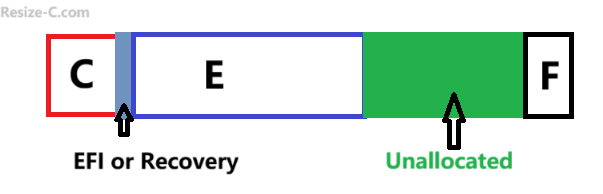
Common Reasons Extend Volume Is Greyed Out
- Unallocated space is not next to C drive.
- A Recovery, OEM, or EFI System Partition sits between C drive and unallocated space.
- The disk uses MBR format and C drive has reached the 4-primary-partition limit.
- Unallocated space exists on another disk.
How to Combine Unallocated Space to C Drive When Extend Volume Is Greyed Out
As an easier approach, IM-Magic Partition Resizer (free), lets you visually move partitions, merge unallocated space, and expand the C drive without deleting volumes.
Easy Fix: Use IM-Magic Partition Resizer
Unlike Disk Management, IM-Magic can shift partitions to the left or right, making unallocated space contiguous so C drive can be expanded easily.
Video: How to create and move unallocated space to C drive
For Windows 11/10/8/7 => Download Partition Resizer Free [100% Free]
For Windows Server 2025-2003 => Download Partition Resizer Server [Trial]
The free tool IM-Magic Partition Resizer allows you to:
- Move EFI, Recovery, and other partitions without data loss.
- Merge unallocated space with C drive even if Extend Volume is greyed out.
- Resize C drive safely with a simple interface.
Also read: How to merge unallocated space to c drive
Case 1: A Partition Sits Between C Drive and Unallocated Space
If another partition (often the Recovery partition) is located between C drive and the unallocated space, Windows cannot combine them.
Steps to Delete a Normal Partition (Not System Partitions)
- Open Disk Management.
- Right-click the partition between C and the unallocated space.
- Select Delete Volume.
- The deleted partition becomes unallocated space.
- Right-click C drive → choose Extend Volume.
When You Cannot Delete a Partition (EFI / Recovery / OEM)
Some partitions should NOT be deleted because they are essential for Windows:
- EFI System Partition (ESP) — required for UEFI boot.
- Microsoft Recovery Partition — needed for Reset/Refresh and WinRE.
- OEM Recovery Partition — added by manufacturers.
Deleting these partitions can make Windows unbootable or remove recovery functions. Disk Management will often block deletion, and this is for safety.
How to Add Unallocated Space to C Drive in Windows 11/10 Without Deleting Critical Partitions
Since Disk Management cannot move partitions, the only safe method is to use a partition tool that can move the blocking partition so the unallocated space becomes adjacent to C drive.
FAQ
Why is Extend Volume still greyed out after shrinking a partition?
Shrinking creates unallocated space to the right of the partition you shrink, not to the right of C drive. If C is not next to the unallocated space, it cannot be extended.
Can I manually move partitions in Disk Management?
No, Disk Management cannot move partitions. It can only shrink, delete, and extend.
Is IM-Magic Partition Resizer safe?
Yes, it is a well-known tool for non-destructive resizing and moving partitions. Always back up important data before modifying partitions.
Can I delete the Recovery or EFI partition?
No. These system partitions should not be deleted because Windows depends on them to boot and recover.
In summary, when the Extend Volume greyed out issue appears, the most reliable fix is using IM-Magic Partition Resizer to move the blocking partitions and merge unallocated space to C drive safely.
More Related Articles You May Like
- Add unallocated space to c drive server 2022
- Move unallocated space nex to the C drive server 2022
- Unallocated space is not adjacent to the c drive
- Change the location of the unallocated space
- Merge unallocated space to c drive
- Cant merge unallocated space to c drive
- Merge unallocated space to c drive using CMD
- how to merge unallocated space to c drive extend volume greyed out
- How to combine nonadjacent unallocated space to the C drive