How to Merge Unallocated Space to C Drive Using CMD
If your system is running low on storage, you may want to merge unallocated space to C drive using CMD. Windows includes a built-in command-line tool called diskpart that can help you extend partitions. This guide covers how to use diskpart, what to do when another partition sits in the way, and why many users prefer a free tool like IM-Magic Partition Resizer.
When CMD Can Add Unallocated Space to C Drive
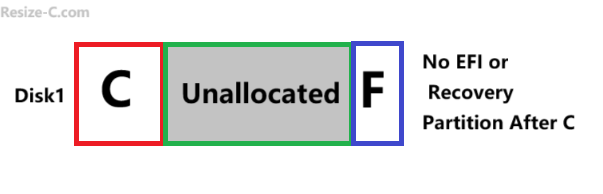
You can only add unallocated space to C drive using diskpart when the unallocated space is located immediately to the right of the C partition on the same disk. Diskpart does not allow moving partitions, so the layout must already be correct.
Steps to Combine Unallocated Space to C Drive Using CMD (diskpart)
- Open Command Prompt as Administrator: Press Windows key → type
cmd→ right-click → Run as administrator. - Run diskpart: Enter
diskpart. - List volumes: Type
list volumeto see partition numbers. - Select C drive:
select volume X(replace X with the C drive volume number). - Extend C: Type
extendorextend size=XXXX(in MB). - Exit: Type
exit.
Example commands:
diskpart
list volume
select volume 2
extend
When a Partition Sits Between C and Unallocated Space
Diskpart cannot move partitions, so if another volume sits in between, you cannot extend C using CMD alone. In such a layout, you may use free tool IM-Magic Partition Resizer.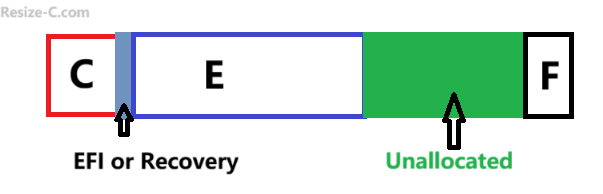
As a significantly easier approach, IM-Magic Partition Resizer lets you visually move partitions, merge unallocated space, and expand the C drive without deleting volumes or using command-line instructions.
Video: How to create and move unallocated space to C drive
For Windows 11/10/8/7 => Download Partition Resizer Free [100% Free]
For Windows Server 2025-2003 => Download Partition Resizer Server [Trial]
Key advantages:
- Move partitions without losing data.
- Merge unallocated space even if it is not next to C.
- Simple and beginner-friendly interface.
- No complex commands; all operations are mouse-driven.
Also read: How to merge unallocated space to c drive
Options When a Partition Blocks the C Drive
- Delete the intervening partition (only if you safely backed up the data).
- Move the partition so unallocated space becomes adjacent — diskpart cannot do this.
- Use a third-party tool that supports moving partitions safely.
Free tool IM-Magic Partition Resizer includes disk cloning and partition copy features that help you back up your disk and its data. The cloning process creates a 1:1 copy, preserving disk properties and all related information.
Also read: How to back up disk or partition
Manual Steps if a Partition Is Between C and Unallocated Space
- Back up the data from the partition standing between C and the unallocated space.
- Delete or move that partition using a partition tool.
- Use
diskpartto extend C drive once the free space is contiguous.
FAQ
Can I undo a diskpart extend?
No. You may shrink the volume if supported, or restore from backup. Always create backups before resizing any partition.
Does merging unallocated space delete C drive data?
No, diskpart does not delete C drive data when extending. However, modifying partitions always carries risk, so backing up is recommended.
Is IM-Magic Partition Resizer safe?
IM-Magic Partition Resizer is widely used for non-destructive partition resizing, and it provides a safer method for moving partitions compared to manual command-line steps.
To summarize: You can merge unallocated space to C drive using CMD only if the unallocated space is already contiguous. If not, consider using IM-Magic Partition Resizer to move or merge partitions safely and easily.
More Related Articles You May Like
- Add unallocated space to c drive server 2022
- Move unallocated space nex to the C drive server 2022
- Unallocated space is not adjacent to the c drive
- Change the location of the unallocated space
- Merge unallocated space to c drive
- Cant merge unallocated space to c drive
- Merge unallocated space to c drive using CMD
- how to merge unallocated space to c drive extend volume greyed out
- How to combine nonadjacent unallocated space to the C drive